
A news site we run has a page that shows today’s petrol prices. ChatGPT read it 157 times last month. It never saw a single price, because the prices are drawn by JavaScript after the page loads and ChatGPT’s reader does not wait for that.
So can AI crawlers execute JavaScript? For the bots behind ChatGPT, Claude and Perplexity the answer is no. They read the HTML the server sends and stop. We checked two ways, a month of that site’s server logs and a page with a code word only JavaScript can reveal, put to five assistants on the same morning.
The short answer is no, and here is what that means
ChatGPT-User and Claude-User, the bots that read a page when a person asks a question, take the HTML and leave, and Perplexity’s search crawler does the same. Between them they fetched 84 single images and one stylesheet in the month, and not one script in 37,045 ChatGPT-User page reads. Their search and training crawlers take the HTML too, and at most download a few script files as text without running them. Anything a script draws, loads or calculates after the page arrives does not exist for them.
Googlebot and Applebot do render, and Google’s AI Overviews and AI Mode work from Googlebot’s rendered index, though when the Gemini app reads a page live it reads the page as the server sends it, like the others.
Bingbot can, and on the news site it fetched scripts for about 250 page loads out of 197,000 page reads, roughly one in 800, which fits Microsoft’s own statement that rendering every page of every site at scale is difficult. Agent products that drive a real browser are a separate case and show up in your logs as ordinary Chrome.
The rule of thumb for a site owner is simple. What ChatGPT sees is “view page source”, not what you see on screen. That was still true when we checked on 25 September 2026.
What a month of server logs shows
A bot that runs a page’s scripts and draws the result behaves like a browser. It asks for the page, then for every script, stylesheet, font and image the page needs. A bot that only reads asks for the page and leaves.
That difference is visible in any server log, so we took the news site’s raw log for the 30 days to 24 September 2026, 2,483,780 requests, and counted, for each named bot, its page requests and the script files it fetched while loading one of the site’s own pages.
Renderers fetch scripts. Fetchers do not. The AI assistants fetched none.
| Bot | Page requests | Scripts fetched while loading a page |
|---|---|---|
| ChatGPT-User | 37,045 | 0 |
| Claude-User | 10,028 | 0 |
| PerplexityBot | 3,193 | 0 |
| OAI-SearchBot | 1,738 | 10 |
| Googlebot | 28,697 | 1,507 |
| Applebot | 4,838 | 3,133 |
| bingbot | 197,404 | 3,037 |
The smaller bots follow the same split. ClaudeBot made 915 page requests and fetched no scripts while loading a page, GPTBot 37 and none. DuckDuckGo’s DuckAssistBot and You.com’s YouBot fetched scripts by the thousand, like browsers.
Google also caches script files across pages, so a low count against 28,697 pages does not mean it skipped rendering, only that it did not fetch the same file 28,697 times. The one small surprise was MistralAI-User, which read 8 pages and fetched 40 scripts, a pattern that matches the June 2026 twelve-assistant test described below, in which Mistral ran the script.
What the counts cannot tell you
Fetching a script does not prove a bot ran it. GPTBot and ClaudeBot sometimes download a script file the way they download a page, as text to read, and a log cannot tell reading from running.
But if a bot ran your page’s scripts it would first have to fetch them, and on a WordPress site those are separate files, so a month with zero script fetches is proof enough. The few images and the one stylesheet the OpenAI, Anthropic and Perplexity bots asked for came each on its own with no page attached, and they fetched not one script while loading a page.
OAI-SearchBot is the exception that proves the pattern. It fetched script files on three occasions in 30 days. Twice it picked up one or two script files on their own.
Once, on 24 September, it loaded one article the way a browser does, the page and then seven scripts, three stylesheets, two fonts and a sound clip inside five seconds. That is one page in 1,738.
OpenAI’s search crawler appears to have a browser it almost never uses, and whether the scripts ran we cannot tell from a log.
These counts come from the host’s own web server log, the layer that answers every request, cached or not, so it records script files as well as pages. Our plugin could not have counted them, because it runs inside WordPress and the web server hands out script, style and image files without waking WordPress up.
Neither do page reads your cache answers reach it, which on the news site was three ChatGPT-User reads in four. The plugin’s log import fills both gaps, because the server’s log file has every request, so once you have imported a log you can search it for script fetches yourself.
The fuel price page the assistants read 237 times without seeing a price
The news site has a fuel price tracker. The HTML carries a proper description, several hundred words on what the tracker shows and where the figures come from. The prices themselves, the five-year chart and the breakdown of what makes up a litre are drawn by more than a dozen scripts. Fetched with ChatGPT-User’s name, the page contains not one price figure.
In the 30 days ChatGPT-User read that page 157 times and Claude-User 80 times, never fetching a script. Each of those 237 reads saw a description of current petrol and diesel prices and no price. The same is true of two other live data pages on the site. Their descriptions are readable, their data is not.
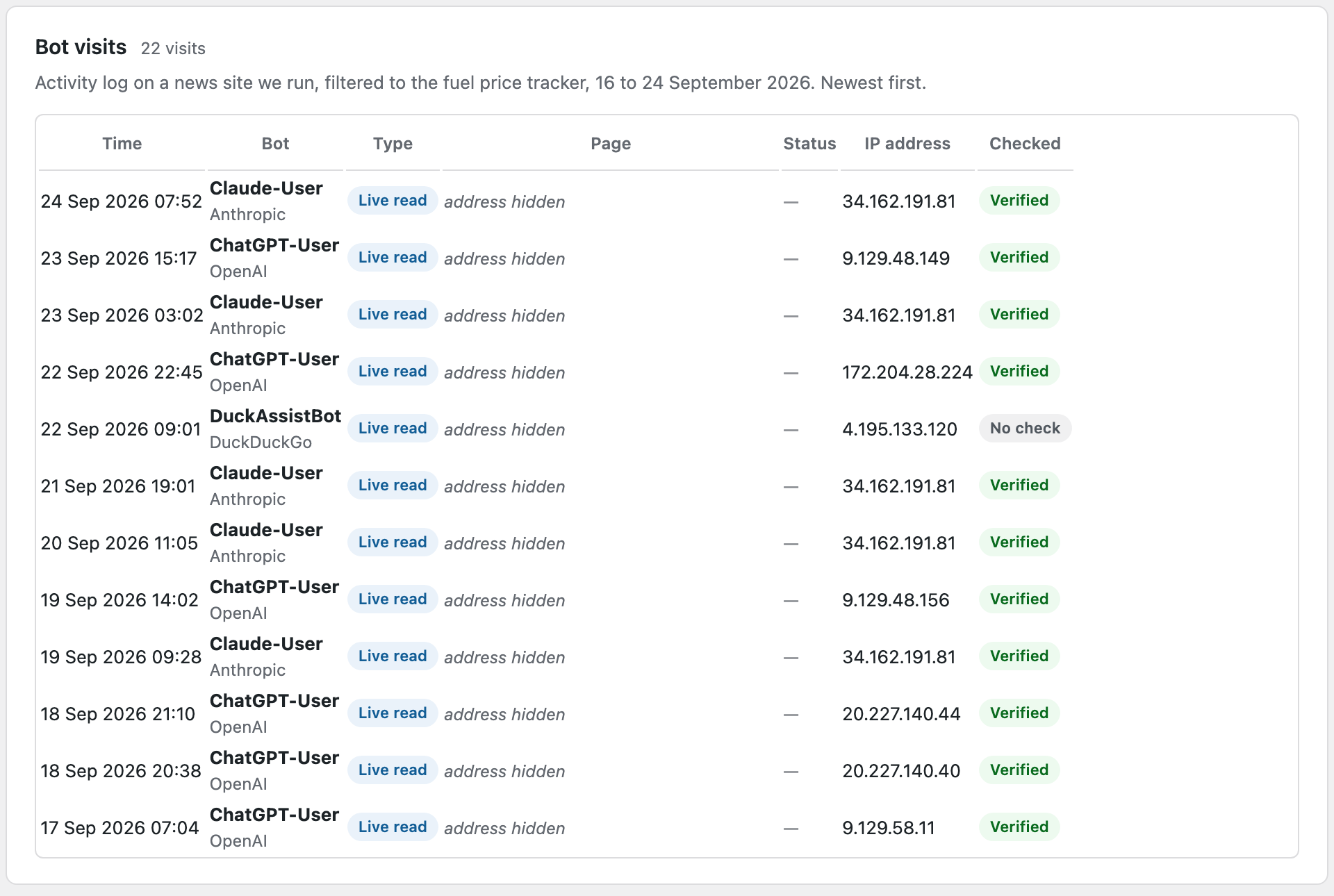
The lesson fits in one line. A tool built with JavaScript is findable and describable to an AI assistant, and its numbers are invisible. Our article on whether ChatGPT is using your website shows the other half of that, an interactive page on the same site that ChatGPT sends people to from its description alone.
We asked five assistants to read a page. Three could.
Logs show what a bot fetched. To see what an assistant reports back to a person, you have to ask one.
The page
We made a page with three code words. One, HARBOUR, is written into the HTML. The other two, LANTERN and BEACON, are added by a short script after the page loads, and the script replaces a sentence that says JavaScript did not run. Then we asked ChatGPT, Claude, Gemini, Perplexity and Copilot on the same morning to open the page and report every code word, one prompt each, with extra tries for the two that failed.
We ran it on two copies of the same page. The first, on this site, was refused to Claude and Perplexity by something in front of our server, so we put a second copy on the news site and pointed the other four assistants at that. Both copies carried the same three words.
| Assistant | Code words reported | What it said about JavaScript |
|---|---|---|
| ChatGPT | HARBOUR only | Only one was visible in the HTML |
| Claude | HARBOUR only | Its fetch tool runs no scripts |
| Gemini | HARBOUR only | Its browsing tool runs no scripts |
| Perplexity | Could not read the page | No finding |
| Copilot | Could not read the page | No finding |
What each assistant said
ChatGPT listed HARBOUR and explained, “only one is visible in the HTML returned to me.” Claude listed HARBOUR, quoted the fallback sentence, and said “the web fetch tool doesn’t run scripts”, then offered to open the page in a real browser, which we declined so the test stayed a fetch test. Gemini listed HARBOUR and said “my browsing tool does not execute JavaScript.” Not one of the three saw LANTERN or BEACON.
What the log showed
Our plugin’s log showed ChatGPT-User on this site and Claude-User on the news site, each from its company’s published addresses, fetching the page within minutes of its answer. Gemini’s fetch could not be matched to a bot name, which fits a published test in which live Gemini fetches carried a bare “Google” label. No Perplexity fetch reached WordPress on either site, though a read answered by the cache would also be invisible.
Note. Perplexity and Copilot did not fail the JavaScript test. They failed to read a page that was minutes old. Both lean on their search indexes, and a page created that morning was in neither. That is our best guess, and our logs show no Perplexity fetch reaching WordPress, so we cannot say why. Treat their rows as no result, not as evidence.
One prompt, one day, one page. That is a small test. It matches the larger ones. In June 2026 Andre Alpar at Search Engine World gave twelve assistants a page with a decoy number in the HTML and the real number written by a script. ChatGPT, Claude, Gemini, Perplexity, Meta AI and Copilot reported the decoy. Grok ran the script and ignored the result. DeepSeek, ERNIE, Qwen, Kimi and Mistral ran it and reported the real number.
What the studies and the vendors say
Our month and our morning match what everyone who has looked properly has found since the end of 2024.
The studies
The study everyone cites is from Vercel and MERJ, published 17 December 2024.
Its finding was that “none of the major AI crawlers currently render JavaScript”, naming OpenAI’s, Anthropic’s, Meta’s, ByteDance’s and Perplexity’s crawlers, while Gemini uses Googlebot’s rendering and Applebot renders through a browser. It also found OpenAI’s crawlers spent 11.50 percent of their requests on that site fetching script files, and Anthropic’s 23.84 percent, without executing any of them. The training crawlers collect scripts as text. They do not run them.
The re-tests since then agree. EdgeComet, in January 2026, watched ChatGPT-User on a fresh domain. It “fetched only the raw HTML document. There were no subsequent requests for CSS, JavaScript, or media files”, and it gave up after five seconds. A 48-day log study by wislr in March 2026 saw the same. Alpar’s twelve-assistant test is above.
What the vendors say
Anthropic’s developer documentation for its web fetch tool says the tool “currently does not support websites dynamically rendered with JavaScript.” That is written for API users, but Claude in our test gave the same answer. OpenAI’s crawler page and Perplexity’s crawler page say nothing about JavaScript either way.
Google says that for Search, “a headless Chromium renders the page and executes the JavaScript”, and its AI features page says a page only needs to be indexed to appear in AI Overviews and AI Mode, so those inherit Googlebot’s rendered index. Apple’s Applebot page says “Applebot may render the content of your website within a browser.”
Agents are different
OpenAI’s browser-driving agents, including the cloud browser in ChatGPT Work, Claude in Chrome and Perplexity’s Comet browser run scripts because they drive a real browser. They do not use the bot names above. An agent visit looks like a person on Chrome.
OpenAI signs its agent’s requests with a header that names chatgpt.com, but a standard server log does not record request headers, so in practice a log cannot tell an agent from a person, and no plugin can list them.
Even then, a study reported by Search Engine Land in October 2025, as quoted by others since the page blocks fetching, found that 46 percent of ChatGPT agent shopping visits began in its plain text reading mode with no scripts at all.
Where the big percentages come from
Two figures travel the web. “69 percent of AI crawlers cannot execute JavaScript” is a count of names on a list of 23 crawlers, not a measurement. “ChatGPT and Claude cannot read 90 percent of websites” has no traceable source. We could not find a study, a test or even a first use. The truth needs no percentage. The three assistants most people care about read raw HTML, full stop.
What this means on a WordPress site
Most of a normal WordPress site is safe, because WordPress builds pages on the server. The trouble starts with anything that arrives after a click, a scroll or a script.
Safe because it is already in the HTML
- Posts, pages and blocks. Every block, including dynamic ones like the query loop, is rendered on the server.
- Interactivity API blocks. WordPress requires the server HTML and the script-driven HTML to match, so the content is there.
- Page builder widgets. Elementor and Divi render their widgets to HTML on the server.
- Tabs and accordions. The text is in the page and only hidden by styling. Elementor’s newer accordion folds it inside a details element and the older one hides it with a style rule. A bot that reads HTML reads all of it.
- Core lazy-loaded images. WordPress keeps the real image address in the tag.
- Embedded posts and videos. The embed code is in the page. An embedded X post carries its text, so it is readable. A YouTube embed is a frame with nothing readable inside it.
- Comments and standard tables. Rendered by PHP, including TablePress tables.
Invisible because a script draws it later
- Load more and infinite scroll. Only the first batch is in the page.
- Images swapped in by a lazy-load plugin. If the real address sits in a data attribute, the bot sees a placeholder.
- Charts, maps and embedded data tools. Drawn as a picture by a script, or loaded in a frame from Datawrapper, Flourish or Google Maps. The numbers are not readable unless they also appear as text.
- Tables that page on the server. wpDataTables with server-side processing switched on sends only the first rows. Its default mode puts the whole table in the page.
- Filters, live search and calculators. The first results are in the page. Everything after a click is not.
- FAQs built by a script. A FAQ block from an SEO plugin is fine. One assembled from data by a widget is not.
- Headless sites without server rendering. On a headless site the page is built in the browser rather than by WordPress, so the HTML is an empty shell and a script tag.
- Pages behind a script challenge. A firewall that makes visitors prove they are human with JavaScript shows the bot the challenge, not the page.
Two tests you can run
Test one, look at the page the way a fetcher does
- Open the page in Chrome and press Ctrl U on Windows or Cmd Option U on a Mac. This is the page as the server sent it, and it is what ChatGPT-User reads. Search it for a sentence you care about. Then open Chrome’s developer tools, click Elements, and search again. Elements shows the page after every script has run. If the phrase is in Elements and not in the source, no AI assistant will see it.
- Or, with the developer tools open, press Ctrl Shift P or Cmd Shift P, type Disable JavaScript, press Enter, and reload. What you see now is close to what ChatGPT gets, with one difference. Text hidden in a closed tab or accordion is still on the page for a bot even though you cannot see it.
If you are comfortable with a terminal, this fetches the page under ChatGPT-User’s name and with its five second patience, throws away everything inside script tags, because a word written inside a script is not a word on the page, and counts the lines that contain your phrase. Zero means ChatGPT never sees it.
Pick a phrase the script builds from data, such as a price, not text typed into the script.
If the number is tiny and the page you got back talks about checking your browser, your firewall challenged the fake bot name, so run it again with an ordinary browser name to tell blocking from rendering.
curl -sL --max-time 5 \
  -A "Mozilla/5.0 AppleWebKit/537.36 (KHTML, like Gecko); compatible; ChatGPT-User/1.0; +https://openai.com/bot" \
  "https://yoursite.com/some-page/" \
  | perl -0pe 's/<script\b[^>]*>.*?<\/script>//gis' \
  | grep -c "phrase that only appears after JavaScript"
Test two, look for script fetches in your log
A renderer leaves a trail. In the plugin, import your server’s log file, open the Activity Log, pick a bot in the Bot dropdown and type .js? in the search box, since WordPress adds a version number to nearly every script it loads. Applebot, YouBot and DuckAssistBot show rows of script files. ChatGPT-User shows none.
The plugin lists AI bots only, so compare Googlebot and Bingbot in the raw log itself.
If a delivery network such as Cloudflare sits in front of your site, its cache answers most script requests itself and your host’s log stays silent about them, so check that the bot’s page reads appear before you trust a zero. Forge AI Bot Log shows you which bots read which pages and checks each one against its company’s published addresses, and its log import brings in the script lines the web server never shows WordPress.
Five fixes that put the content back in the HTML
- Put the numbers in words. Under every chart, tracker or calculator, a sentence or a small table with the key figures. That is what the assistant reads and repeats.
- Keep the first batch in the page. Anything paged or loaded on scroll should show its first screen in the HTML and give later pages their own addresses.
- Use WordPress’s own lazy loading. It keeps the real image address in the tag. Plugins that swap addresses in later do not.
- Render headless sites on the server. Every framework can. An empty shell is invisible to the ChatGPT, Claude and Perplexity readers, and readable only by the bots that render, which in our log means Google, Apple, Bing and a few smaller ones.
- Do not expect a side door. Neither an llms.txt file nor markdown served to bots fixes a JavaScript problem. Markdown for bots is converted from the same server HTML, and almost no fetcher requests llms.txt.
Common questions
Does ChatGPT render JavaScript?
This is about ChatGPT reading your site, not about it drawing HTML inside the chat window. When ChatGPT reads a page for a person it uses ChatGPT-User, which fetches the HTML and nothing else. In our test it saw the HTML code word and not the two added by script, and said so.
Can Google’s AI Overviews see my JavaScript content?
Usually, yes. AI Overviews and AI Mode work from Google’s search index, and Googlebot renders pages with a real browser engine before indexing them. The exception is a live fetch by Gemini when someone pastes your address into it, which in our test and in a published test read raw HTML only.
Do AI bots see content in tabs and accordions?
Yes, as long as the text is in the page and only hidden by styling, which is how WordPress block and page builder accordions work. A bot reading HTML does not care what is folded shut. The exception is an accordion that loads its contents from the server when clicked.
How do I know if an AI agent, not a bot, visited my site?
Mostly you cannot. An agent driving a real browser looks like a person on Chrome. OpenAI signs its agent’s requests with a header that names chatgpt.com, and some firewalls recognise it. Claude in Chrome runs inside the person’s own browser, so it is the person’s visit. None of these carry the bot names a plugin can watch for.
See what the bots actually read on your site
Install Forge AI Bot Log free and open the activity log. Filter it to ChatGPT-User, open the three pages it reads most, and view the source of each. If the thing you most want people to know is not in there, it is not in ChatGPT’s answer either.