
Open your server log and you will find GPTBot, ClaudeBot, Amazonbot and a dozen names you have never heard of, all reading your pages. Half the advice online says block the lot. The other half says block anything and you vanish from ChatGPT. Both are half right, because the phrase “AI bots” covers three different jobs, and the right answer for one job is the wrong answer for another.
This article sorts the bots into those three jobs, shows what 30 days of real bot traffic looks like on one site, gives you a default that most sites can start from, and walks through how to block AI bots on WordPress and check that it worked.
The short answer
Block the bots that copy your pages to train AI models, because nothing comes back from them. Allow the bots that build AI search indexes, because blocking them removes you from those products. Allow the bots that read a page when a real person asks a question, because those are the visits that turn into visitors. Everything below explains why, and where that rule breaks.
The three jobs AI bots do on your site
Most of the big AI companies now run more than one bot, and each one announces a different name so you can treat them differently. Once you know which job a name belongs to, the decision gets much easier.
Training crawls copy your pages for future models
These bots download pages in bulk so the text can be used to build the next version of a model. No person is asking a question at the time. Nothing links back to you, and nothing you do later removes what was already copied.
OpenAI’s GPTBot and Anthropic’s ClaudeBot are the best known. Both companies say plainly that the pages these bots collect may be used for training.
Meta-ExternalAgent and Amazonbot are described by their owners as for training or indexing (Meta) and for improving Amazon’s products, with training as a possible use (Amazon). CCBot builds the Common Crawl archive, a free copy of the web that many model builders have drawn on. ByteDance’s Bytespider has no public documentation page we could find, so we class it from what it does in server logs.
Search crawls build an index so an assistant can find you later
These work like Googlebot. They visit ahead of time and store what they find, so that when someone asks a question next week the assistant can look you up and link to you. Nobody is asking anything when the visit happens.
OpenAI’s OAI-SearchBot feeds ChatGPT’s search feature, and OpenAI says it is not used for training. PerplexityBot does the same for Perplexity, and Claude-SearchBot for Claude. Applebot powers Siri, Spotlight and Safari suggestions. Block one of these and you drop out of that product’s index. Its answers stop linking to you, because it can no longer find you, until you lift the block.
Live reads happen when a real person asks a question right now
Someone types a question into ChatGPT. The assistant decides your page might answer it, fetches the page at that moment, reads it, and writes a reply that may link to you. That single fetch is a live read. The names are ChatGPT-User, Claude-User, Perplexity-User and DuckDuckGo’s DuckAssistBot, and Meta has a similar one called Meta-ExternalFetcher.
These are the visits that turn into people on your site. They are also the ones the vendors treat differently. OpenAI and Perplexity both say that because a person triggered the fetch, their rules for robots.txt may not apply to it. More on that below.
Quick reference
What each bot’s owner says it is for, and whether the owner says it obeys robots.txt. Links go to the owner’s own page.
| Bot | Job | Obeys robots.txt |
|---|---|---|
| GPTBot (OpenAI) | Training | Yes |
| OAI-SearchBot (OpenAI) | Search | Yes |
| ChatGPT-User (OpenAI) | Live read | May not apply |
| ClaudeBot (Anthropic) | Training | Yes |
| Claude-SearchBot (Anthropic) | Search | Yes |
| Claude-User (Anthropic) | Live read | Yes |
| PerplexityBot (Perplexity) | Search | Not stated on its page |
| Perplexity-User (Perplexity) | Live read | Generally ignores it |
| Applebot (Apple) | Search | Yes |
| Meta-ExternalAgent (Meta) | Training and indexing | Yes |
| Meta-ExternalFetcher (Meta) | Live read | May bypass |
| Amazonbot (Amazon) | Training and products | Yes |
| CCBot (Common Crawl) | Open archive used for training | Yes |
| DuckAssistBot (DuckDuckGo) | Live read | Yes |
| Bytespider (ByteDance) | Training, no public documentation | Reported to ignore it |
| Google-Extended (Google) | Opt-out from training, not a bot | Yes |
| Applebot-Extended (Apple) | Opt-out from training, not a bot | Yes |
The last two rows are not bots at all but opt-outs, a name you can put in robots.txt to decline training. They get their own section further down.
What 30 days of AI bot traffic looks like on a real site
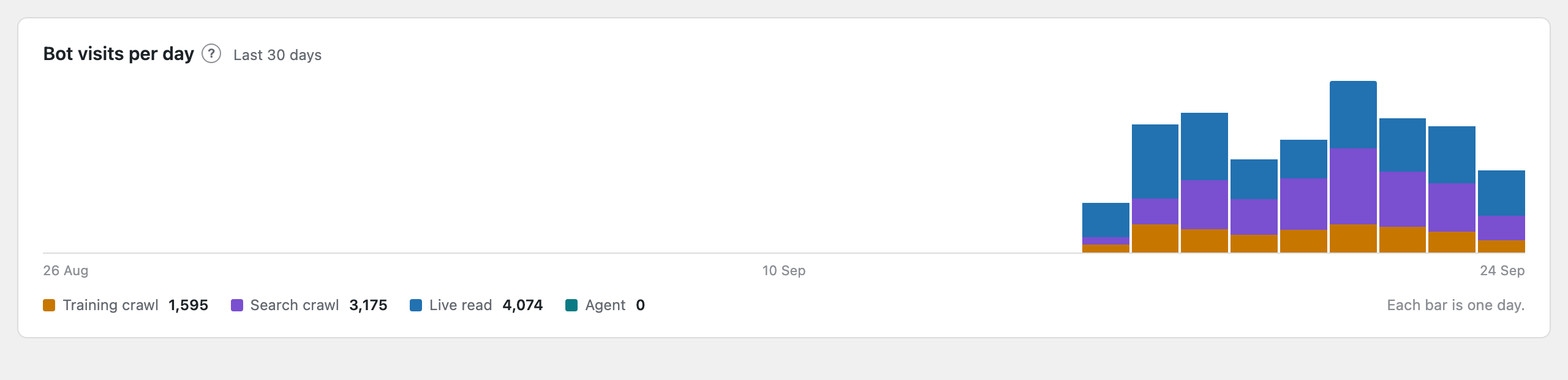
Advice is easier to judge with numbers in front of you. Here are the last 30 days on a travel guide site we run, as recorded by our own plugin (bot visits by the free plugin, visitors by the Pro add-on). It is one site and one month, so treat it as a worked example rather than a law, but the shape of it matches what the big network operators report.
The numbers
The site recorded 1,941 visits from 10 different AI bots. Split by job, that was 850 training crawls, 843 search crawls and 248 live reads. In the same 30 days, 10 people arrived on the site by clicking a link inside an AI assistant’s answer, landing on six different pages. Seven came from ChatGPT, two from Perplexity and one from Microsoft.
| Job | Bot visits in 30 days | Visitors that followed |
|---|---|---|
| Training crawls | 850 | None expected, none seen |
| Search crawls | 843 | Indirect, via later answers |
| Live reads | 248 | 10 visitors, to 6 pages |
The busiest single bot was Amazonbot with 754 visits, 39 percent of everything. Amazon says the bot is used to improve its products and services and may be used to train its AI models. No visitor arrived from an Amazon assistant in the month, which is what you would expect from a bot whose job is collecting rather than answering. It still means more than a third of the bot traffic on this site was one company copying pages for its own use.
OpenAI’s bots tell the other half of the story. ChatGPT-User read pages 124 times and OAI-SearchBot crawled 78 times, and seven people arrived from ChatGPT. Claude-User read 92 times and nobody arrived from Claude in that month.
Across all assistants, 248 live reads produced 10 visitors, which the Pro add-on reports as four visitors per 100 live reads. One of the 10 came from Microsoft, which is not among the bots listed above, so the true figure for those bots is a little under four.
These counts are a floor. This site serves most pages from a cache, and a bot visit answered by the cache never reaches WordPress, so the plugin never sees it. The real totals are higher. Why caches hide bot visits, and two fixes.
What the numbers mean
Forty-four percent of the bot visits were training crawls, and they returned nothing. That is the case for blocking them, in one line. Search crawls were another 43 percent. They send nobody on the day, but they are the reason an assistant can link to you later, so they earn their keep quietly. The live reads were 13 percent of the bot traffic and produced every visitor.
Ten visitors from 248 live reads is not a bad rate. It means that roughly one time in 25 that an assistant read a page to answer someone, the person clicked through. The other 24 times the answer was good enough on its own. Your page still did the work, even though you never saw the person.
The wider picture
Cloudflare sees a large share of the web’s traffic and publishes the same comparison at network scale. In its August 2025 analysis, training accounted for nearly 80 percent of AI bot activity. For every visitor Anthropic’s assistant sent to a site, its bots had fetched about 38,000 pages. OpenAI’s figure was about 1,100 pages per visitor, Perplexity’s about 195, and Google’s about 5.
Google’s number is low because Google still sends search traffic. That gap is the whole reason the three-job split matters.
Block training bots, allow AI search bots, allow live reads
This is the default we suggest for a business site that wants to be found. It is also the pattern that sites which write AI rules at all are settling on. Cloudflare’s network data, as compiled by TechnologyChecker in September 2026, shows sites blocking GPTBot and ClaudeBot more than twice as often as they allow them, while OAI-SearchBot is allowed slightly more often than it is blocked.
The rule
- Block training crawls. GPTBot, ClaudeBot, CCBot, Amazonbot, Meta-ExternalAgent, Bytespider. They give nothing back, and blocking them does not touch your Google rankings, because Google uses Googlebot for Search, not any of these.
- Allow search crawls. OAI-SearchBot, PerplexityBot, Claude-SearchBot, Applebot. Blocking them drops you out of that assistant’s index, so its answers stop linking to you until you lift the block.
- Allow live reads. ChatGPT-User, Claude-User, Perplexity-User, DuckAssistBot. A person is waiting on the other end, and some of them will click.
If you only do one thing, block GPTBot and ClaudeBot and leave everything else alone. You lose nothing you can measure, and you keep every route by which an assistant can send you a reader.
None of this is permanent. Well-behaved bots re-read robots.txt regularly, so if you block something and regret it, remove the line and the bot returns within a day to three. Choosing wrong costs you a few days, not your traffic.
When to do something different
- You license your content, or you are in a dispute over it. Block everything from the companies involved, including their search and live-read bots, and use a server rule so it sticks. Accept that you will disappear from their answers.
- You sell to people who ask assistants for recommendations. Allow everything, including training, on the theory that a model which has read your site is more likely to name you. Nobody can measure that effect from the outside, so treat it as a bet, not a plan.
- A single bot is hammering your server. Do not block by job. Slow that one bot down. Anthropic says its bots honour a crawl-delay line in robots.txt, which asks a bot to wait between requests, and for the rest the fix is to cap how often that bot may request pages, which your host or a CDN (a service such as Cloudflare that sits in front of your site) can do.
The Google and Apple exceptions
Google does not have a separate training bot. Instead it publishes a name called Google-Extended that you can put in robots.txt to say the pages Google already crawls may not be used to train its Gemini models or feed their answers.
No bot ever identifies itself as Google-Extended. Googlebot does the fetching as usual, and Google reads the line afterwards to decide what the pages may be used for. Google states that the line has no effect on whether you appear in Google Search or how you rank.
What Google-Extended does not cover is AI Overviews and AI Mode inside Google Search. Google’s guidance on AI features in Search says these features are part of Search and are controlled by the same Googlebot rules as Search. There is no line you can add to be in Google Search but out of AI Overviews. The only levers are the snippet controls that also shorten your normal search listing.
Apple works the same way. Applebot does the crawling for Siri and Spotlight. A second name, Applebot-Extended, is an opt-out from having those pages used to train Apple’s models, and Apple says using it does not affect whether you show up in Siri, Spotlight or Safari.
Both opt-outs fit the default rule. Add them alongside GPTBot and ClaudeBot and you have declined training everywhere it can be declined.
Which bots ignore robots.txt
Robots.txt is a request, not a lock. A bot has to choose to read it and choose to obey. Most of the big names do, and you can hold them to it, but a few do not, and you should know which before you rely on it.
Bots whose makers say so
Perplexity states that Perplexity-User generally ignores robots.txt because a person asked for the page, and offers a list of its addresses so you can block it at the server instead. OpenAI says the same rules may not apply to ChatGPT-User for the same reason, although when Cloudflare tested it in August 2025 the bot fetched robots.txt and stopped when told to. Meta says its fetcher may bypass robots.txt for user-requested pages.
Notice that all of these are live-read bots. Under the default rule you are allowing them anyway, so their attitude to robots.txt only matters if you decide to shut a company out entirely.
Bots caught doing it
In August 2025 Cloudflare reported that when Perplexity’s declared bot was blocked, an undeclared crawler pretending to be an ordinary Chrome browser fetched the pages instead, from addresses Perplexity had not published. Cloudflare removed Perplexity from its list of verified bots as a result.
Bytespider has repeatedly been reported to ignore robots.txt, from Fortune’s reporting in October 2024 onward. TollBit’s State of the Bots reports, which measure bot traffic across publisher sites, have found a growing share of AI bot requests reaching pages that robots.txt disallows, and its first-half 2026 figures, as reported by PPC Land, named Bytespider, ChatGPT-User and YouBot as reaching blocked pages on close to half the European sites that named them.
What you can do about them
For a bot that ignores robots.txt but still uses its real name, block the name at the web server, which turns the request away before WordPress runs. The next section shows how.
For a bot that publishes its addresses, such as Perplexity-User, your host or CDN can block those addresses. For a bot that hides behind a browser name and unpublished addresses, nothing on your site can tell it apart from a person, and no plugin or tracker will. Be suspicious of any product that claims otherwise.
How to block AI bots on WordPress
There are three ways, from easiest to strongest. Most sites need only the first.
With robots.txt, one rule per bot, including GPTBot and ClaudeBot
WordPress makes a robots.txt file for you on the fly. Unless you or an SEO plugin created a real file, there is nothing on disk, and the contents come from WordPress and any plugin that adds to it. You add lines to it through an SEO plugin’s robots.txt editor, through our plugin, or by creating a real file. Each bot gets its own two lines, and the name is not case-sensitive.
User-agent: GPTBot
Disallow: /

User-agent: ClaudeBot
Disallow: /

User-agent: Google-Extended
Disallow: /
Add the same pair for CCBot, Amazonbot, Meta-ExternalAgent, Bytespider and Applebot-Extended if you are following the default. If a real robots.txt file exists in your site’s root folder (check with your host’s file manager), put the lines in that file, because a real file replaces the one WordPress generates. Meta and Amazon both say allow up to 24 hours for the change to take effect, and DuckDuckGo says 72 hours.
If your site uses a caching plugin or a CDN such as Cloudflare, clear the cache after you change robots.txt. Otherwise bots may keep receiving the old version for hours.
With a server rule, for the bots that ignore robots.txt
A server rule refuses the request by name before WordPress starts. On hosts that use Apache, this goes in the .htaccess file in your site’s root folder, above the line that reads “# BEGIN WordPress”. Back the file up first, because a typo here takes the whole site down.
<IfModule mod_rewrite.c>
RewriteEngine On
RewriteCond %{HTTP_USER_AGENT} (Bytespider|Perplexity\-User) [NC]
RewriteRule .* - [F,L]
</IfModule>
Some managed hosts, including Kinsta and Flywheel, use Nginx and ignore .htaccess. There the equivalent is a short rule in the server configuration, which you will usually need to ask the host to add, or a rule in the host’s firewall. Pantheon does not accept custom server rules at all, so ask them about their firewall instead.
if ($http_user_agent ~* "(Bytespider|Perplexity-User)") {
    return 403;
}
Be careful what you put in a server rule. A server block on ChatGPT-User or Claude-User stops the live reads that send you visitors, which is the opposite of the default. Reserve server rules for bots you have decided to shut out completely.
If your site is behind Cloudflare
Cloudflare offers its own AI bot controls, and since July 2025 it has blocked AI crawlers by default for new sites. Its older one-click setting blocks bots it classes as training crawlers, and the newer controls split search, agent and training so you can choose per job, much like this article does.
One thing to check is whether Cloudflare is already blocking bots you meant to allow. It is a common surprise, and it happens before any request reaches WordPress, so no plugin can see it.
With Forge AI Bot Log
Our free plugin does the robots.txt part for you and, more usefully, shows you which bots actually visit before you decide. Every bot is labelled with its job, and the Access Control screen has one switch per bot.
Flip a switch and the two lines are added to the robots.txt WordPress generates. If a real robots.txt file exists on your server, the switches do nothing until you remove it, because the real file wins. Once you block a bot that ignores robots.txt, the plugin writes the .htaccess snippet above for you to paste in. How blocking works in the plugin.
Things blocking cannot do
- It cannot take back pages already collected. A block starts from the next visit.
- It cannot stop a bot that uses a disguised browser name. Nothing on your site can, because the request looks like a person.
- It cannot separate Google Search from AI Overviews. Both use Googlebot, and Google offers no split.
- It cannot tell you how often an assistant quotes you. Nothing that reaches a web server reveals what an answer said. What you can see is live reads and the visitors that follow, which is covered in how the numbers work.
Decide per bot, then check the log
So, should you block AI bots? Block the ones doing a job that returns nothing, which for most sites means the training crawls plus the Google and Apple opt-outs. Keep the search crawls and the live reads, because that is the path by which an assistant can send someone to you. Decide one bot at a time, not all of them at once.
Then check it worked. Open yoursite.com/robots.txt in a browser and make sure your lines are there. Give it two days and look at the log. A well-behaved bot you blocked should have gone quiet.
A bot you blocked at the server will vanish from any plugin’s log entirely, because it never reaches WordPress, so test that one by sending a request that uses its name and expecting to be refused. From a terminal, this asks for your home page as Bytespider and should print 403, the code a server uses to refuse a request.
curl -A "Bytespider" -o /dev/null -w "%{http_code}" https://yoursite.com/If your counts look too low to be true, the cache is hiding visits, which is a separate problem with its own fix.
See your own 30 days before you decide
The free plugin records every AI bot visit, labels each one by job, checks the major bots are who they say they are, and gives you one switch per bot. Install it, wait a month, then block AI bots with the numbers in front of you.