
You allowed the AI bots in robots.txt. You installed a tracker. And the numbers look too low, or a bot you allowed never shows up at all. Two separate things can cause that, and neither is visible from inside WordPress.
The short answer
A cache is a saved copy of a page, handed out without running WordPress. Any counter that lives inside WordPress never sees a request the cache answered. People can still be counted from their browser. Bots run no browser code, so their cached visits are simply gone.
Separately, more and more hosts and content delivery networks refuse or slow down AI bots at the edge, the network layer in front of your server, before the request reaches WordPress. Your robots.txt is never consulted and nothing in your dashboard says it happened.
A rule of thumb for telling them apart. If bots appear in your log but the counts look low, suspect the cache. If a bot you allowed never appears at all, suspect a block. The test below settles it in two minutes, and there are four levers, one of which is the one you need.
How a cache hides bot visits
A full-page cache keeps a finished copy of each page and serves it to the next visitor without starting WordPress. Caching plugins do this, and most managed hosts do it in front of your site whether you asked or not. It is why your site is fast. It is also why a bot reading a popular page leaves no trace inside WordPress, because WordPress never ran.
Bots are hit hardest for two reasons. They tend to read the pages people ask about, which are exactly the pages a cache holds. And they run no scripts, so the trick that rescues human visits, a small piece of code in the page that reports back, does nothing for them.
Here is what that costs on a real site. A news site we run recorded 131 visitors sent by AI assistants over nine days in September 2026, and 4,077 live reads in the same window, where a bot fetched a page because someone had just asked an assistant about it. Yet for 95 of those 131 visitors, 73 percent, our Forge AI Bot Log plugin could find no bot visit on the page beforehand. For 33 it found an earlier crawl, and for 3 a live read minutes before.
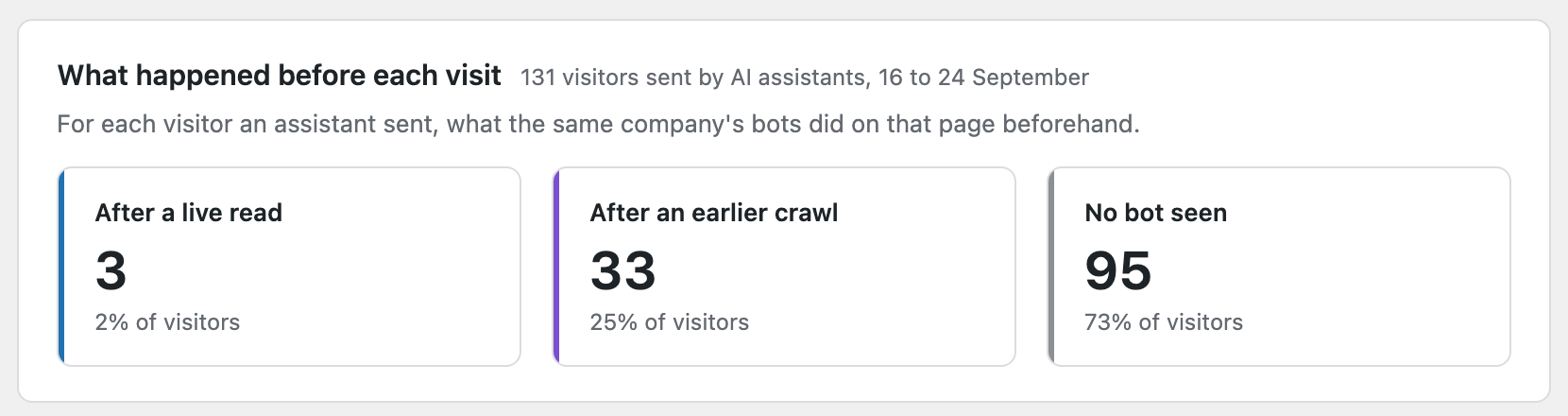
The bots that fetch pages for chat answers are on this host’s allowed list, so blocking does not explain the gap. The cache is the largest cause we can see. Some of the gap is assistants answering from a search index without fetching the page at all, some is reads older than our log, and some is a bot reading a different address for the same page. So treat 73 percent as the most the cache could be hiding, not a measurement of it.
Both sites where the plugin is installed are on SiteGround. Our plugin’s own check found a host cache sitting in front of each site, switched visitor counting to the browser method automatically, and reported that the host’s cache cannot be told to let bots through by name. Our guide to caching and low counts has the table of where to paste the bot names for each caching plugin and host.
Why a host block never shows in WordPress
Hosts and content delivery networks sit in front of your server. When one of them refuses a bot, the request ends there. WordPress does not run, your robots.txt is not read, and no plugin can record what never arrived. The policies below are all published. The problem is that none of them show up in the places a site owner looks.
Cloudflare
Since 1 July 2025 Cloudflare has blocked AI crawlers by default for new domains. A domain added after that date is asked at setup, and turns AI bots away unless the owner chose to allow them. Its AI Crawl Control, on all plans, lets you allow or block each crawler by name.
Separately, its managed robots.txt adds lines to your robots.txt that you did not write, telling Amazonbot, Applebot-Extended, Bytespider, CCBot, ClaudeBot, Google-Extended, GPTBot and meta-externalagent to stay off your pages altogether. Cloudflare labels the setting as blocking training.
Cloudflare places its lines before yours and serves both as one file. If you have ever opened your robots.txt and found rules you do not remember adding, that is where they came from.
On its own, Cloudflare hides nothing, because it does not cache HTML by default. It only starts hiding bot visits if a cache rule you set, its paid Automatic Platform Optimization add-on for WordPress, or a host built on Cloudflare such as Kinsta Edge Caching or WP Engine Global Edge Security caches your pages at the edge.
SiteGround
SiteGround says it blocks, at server level and by default, the AI crawlers built to collect content for model training, while allowing the bots that fetch pages when a real person is using an assistant. Its allowed list names ChatGPT-User, OAI-SearchBot, Claude-User, Claude-SearchBot, PerplexityBot, Perplexity-User and several Google agents. There is no setting for it in the control panel that we could find. Customers can add their own blocks in .htaccess, and SiteGround points to support for anything else.
WP Engine
WP Engine’s security page says its firewall gives human traffic priority over bot traffic, blocks known malicious bots, and declines to describe the rules further.
In 2026 Search Engine Land reported, from one site’s logs over seven days in April, that on WP Engine requests from GPTBot and ClaudeBot were answered with a 429 “too many requests” code about 29 percent of the time and Amazonbot about 51 percent. The cached copies got through. Every request that reached the server itself was refused, and support described the rule as protection for server performance with a way to ask for an exception rather than a switch.
We have not tested a WP Engine site ourselves, so those figures are Search Engine Land’s, from one site. WP Engine added bot management controls to its Global Edge Security product in June 2026.
Kinsta
Kinsta’s Bot Protection defaults to blocking malicious traffic only, allows most verified bots at every level, and has a separate switch to block AI crawlers entirely, including verified ones, that you turn on yourself. At the two stricter levels it challenges AI crawlers that request pages at a high rate. Search Engine Land reported that Kinsta’s chief technology officer said in March 2026 that Kinsta would not block AI bots at platform level, and that Pressable does not block them by default either.
Every host differs, and every host changes. Which is why the test matters more than the list.
What we found on three sites on two hosts
On 24 September 2026 we sent requests carrying nine well-known bot names to three sites we run, two on SiteGround and one on a New Zealand server host with its own page cache and no bot filtering. We asked for a static file the plugin does not log, then repeated GPTBot and ClaudeBot against uncached page addresses five times each.
| Name sent | SiteGround site 1 | SiteGround site 2 | NZ server host |
|---|---|---|---|
| GPTBot | 200 | 200 | 200 |
| ClaudeBot | 200 | 200 | 200 |
| CCBot | 200 | 200 | 200 |
| Bytespider | None | None | 200 |
| meta-externalagent | None | None | 200 |
| ChatGPT-User | 200 | 200 | 200 |
| OAI-SearchBot | 200 | 200 | 200 |
| Amazonbot | 200 | 200 | 200 |
| Applebot | 200 | 200 | 200 |
“None” means no response at all. The server accepted the connection and then closed it without sending anything, over both the old and the new version of the web protocol. That is what a server-level drop looks like. It matches SiteGround’s published policy, and it fits the plugin’s logs, where neither of those two names appeared once in a month, though a bot that never visited would look the same. GPTBot and ClaudeBot got 200 every time, including five requests in a row to uncached addresses.
Without curl’s quiet flag, the drop is reported like this.
curl: (92) HTTP/2 stream 1 was not closed cleanly: PROTOCOL_ERROR (err 1)Two limits on what this shows. We sent the names from an ordinary address, and a host that checks a bot’s real address may treat the genuine bot differently from our imitation. And SiteGround says it blocks training crawlers, yet GPTBot and ClaudeBot got through by name, so either the block is narrower than the description, or it looks at more than the name. The test shows the mechanism. It does not reveal a host’s whole policy.
The cache half, demonstrated
Then we closed the loop on the other mechanism. Using the GPTBot name, we requested the news site’s home page, which the cache holds, and an address with a made-up query on the end, which the cache does not. The home page came back stamped as served from the saved copy. The made-up address came back stamped as freshly built. In the plugin’s log a minute later, every one of the uncached requests was there, and the cached one was not.
| Request with the GPTBot name | What the cache reported | In the plugin’s log |
|---|---|---|
| Home page | HIT | No |
| Home page plus a made-up query | MISS | Yes |
| Five more made-up queries | MISS | Yes, all five |
That is the whole problem in one table. Same bot name, same site, same minute. The visit to the page people actually read is the one that vanished.
How to check if AI crawlers can access your site
The test is one line in a terminal, and it needs nothing installed on a Mac or Linux machine. It answers both halves at once, because a bot that gets a 200 from an uncached address is allowed in, and whether it then shows in your log tells you what the cache is doing.
for i in 1 2 3 4 5; do
  curl -sL -o /dev/null -w "%{http_code}\n" -A "GPTBot" "https://yoursite.com/?check=$i$RANDOM"
done
Swap GPTBot for any name you care about, and yoursite.com for your address. The made-up query on the end is one the cache has never seen, so the request has to reach your server, and five tries in a row will show a pattern a single request would miss. It works in the Mac and Linux terminal and in Git Bash on Windows, not in PowerShell. Read the five codes like this.
- 200 every time. The name is allowed through. That does not rule out throttling under a real crawl, and on a host that checks addresses the genuine bot may still be treated differently. If you still doubt it, paste in the bot’s full published name string, since some rules match on more than the bare word.
- 403. Refused. On a site behind Cloudflare this may be a challenge aimed at your imitation rather than at the real bot, because the real bot comes from published addresses that Cloudflare recognises and your copy does not. Treat it as inconclusive there.
- 429, on some or all tries. The host is refusing that bot’s requests when they reach the server. Search Engine Land found WP Engine answered every uncached request with 429 and only cached copies got through.
- 000. Nothing came back. Either the server accepted the connection and dropped it, which is a hard block, or the address itself is wrong, so check the address in a browser first. To see the reason, change
-sLto-sSLand curl prints a line such asEmpty reply from serverabove the 000.
Two things to know before you run it. Each request to a page will be recorded by any bot tracker on your site as that bot, from your address, so expect a handful of test rows marked as unverified or spoofed, because they came from your address rather than the bot’s.
And a bot blocked at the edge by a content delivery network never reaches your server at all, so it will not be in your server log either. A bot blocked by the host’s own web server usually is, with a refusal code beside it, sometimes an unusual one such as 444 for a dropped connection.
The symptom of a block is an empty log. A bot you allowed in robots.txt that never appears in any WordPress plugin, for weeks, is either not interested in your site or not getting through. The test above tells you which.
Four levers, and which one you need
Tell the cache to let AI bots through
Most caching plugins have a box for names that should never be served from the cache. WP Rocket calls it Never Cache User Agent(s), under Advanced Rules. LiteSpeed Cache calls it Do Not Cache User Agents, under Excludes. Both match on part of the name, so a bare word like GPTBot works. WP Rocket warns that a broad pattern can switch caching off for everyone, and the same is true in LiteSpeed.
Paste the bot names, one per line. Every bot page view then runs WordPress, which is a small cost on most hosting and worth watching on the cheapest shared plans. You need this if bots appear in your log but the counts look low, and your cache is a plugin you control.
Import the server log
Your web server writes a line for every request it answers, cached or not. If WordPress can read that file, the visits the cache hid can be recovered from it. The free version of the plugin imports it on demand, and Pro reads it every hour once you give it the file’s location, skipping anything already recorded.
Some managed hosts, including SiteGround and WP Engine, keep the log where WordPress cannot reach it. There you download the log from the host’s control panel, copy it into a folder WordPress can read, and give the plugin that file’s location.
You need this if the cache belongs to your host and has no setting for bots, which is the SiteGround situation, or needs a support ticket to add one, which is the Kinsta and WP Engine situation.
Turn off the block, if you want the bots
On Cloudflare, open AI Crawl Control and set the crawlers you want to Allow, and check whether the managed robots.txt is on. On Kinsta, check the AI crawler switch and the protection level. On WP Engine, as reported, it is a support conversation. On SiteGround, the published block is the default and there is no switch, so ask support what can be changed. You need this if the test returned 403, 429 or nothing for a bot you meant to allow.
Accept the floor, and say so
Some hosts allow none of the above. The count you have is then a minimum, not a total, and the honest thing is to label it that way in anything you report. Our plugin puts a warning at the top of its dashboard when it detects a cache, for exactly that reason. You need this if the other three are closed to you.
Hidden and blocked are different problems
Hidden means the bots got your pages and you did not know. Blocked means they did not get them and you did not know. The first is a counting problem. The second is a decision someone else made for you, and it may be one you agree with. Our guide to whether to block AI bots sets out how to decide by job, and once you have decided, the test above tells you whether your host is already doing something different.
Common questions
Does Cloudflare hide bot visits?
Not by default, because it does not cache pages, only files like images and scripts. It can block bots, which is a different problem, and it does so by default on sites set up since July 2025. If your host runs its own edge cache on top of Cloudflare, or you turned on a rule that caches pages, then it hides visits too.
My host says it allows AI bots, so why is my log empty?
Because allowed and counted are different. The host lets the bot in, the cache answers it, and WordPress never runs. Run the test with an uncached address. If you get 200 and the request appears in your log, the bot is allowed and the cache is the reason your log is quiet.
Will letting bots bypass the cache slow my site?
Slightly, for the bots only. Each bot page view runs WordPress instead of reading a saved copy. On our sites that is a few thousand extra WordPress runs a month against many more human visits. On very cheap shared hosting with a fast crawler it can matter, which is when the server log import is the better lever.
See what your cache and your host are doing
Forge AI Bot Log detects the common caching plugins and managed hosts and tells you plainly when your bot counts are a floor, with the names to paste and the log import to recover the rest. Pro checks your own home page for a cache, switches visitor counting to the browser when it finds one, and reads your server log every hour once you tell it where the file is.