
You open Google Analytics, search the traffic report for chatgpt.com, and find a handful of sessions. Meanwhile your server log shows ChatGPT reading your pages hundreds of times a week. Both are true at once. Google Analytics is not broken. It is looking at one slice of what AI does with your site, and it loses part of even that slice.
This article shows how to track AI traffic in Google Analytics properly, including the AI Assistant channel Google added in May 2026, then explains the three places AI traffic still goes missing, with a full sorting of 131 real AI visits on one of our sites to show how big each gap is. The GA4 part takes five minutes.
The short answer
Two words come up throughout. The referrer is the address of the page a visitor came from, which their browser usually sends along with the click. The tag is a label an assistant adds to the end of a link, such as utm_source=chatgpt.com, so the destination can tell where the click started.
Google Analytics loses AI traffic in three separate places. AI bots never run its script, so every page an assistant reads to answer someone is invisible. Visitors who click through from an AI app often arrive with no referrer, and Google Analytics then files them under Direct or Unassigned. Clicks from Google’s AI Overviews are counted as ordinary Google search. What it can see, since May 2026, is a new AI Assistant channel, and you should use it. What it cannot see needs a count on your own site.
How to track AI traffic in GA4 with the AI Assistant channel
In May 2026 Google added a default channel called AI Assistant. Google’s channel definitions describe it as the channel for visitors who arrive from sources like ChatGPT, Gemini, Deepseek, Copilot or Grok. Nothing to set up on your side. Open Reports, then Acquisition, then Traffic acquisition, and AI Assistant appears as a row alongside Organic Search and Referral.
Three things to know about it.
- Google recognises the assistant from the referrer, as Search Engine Journal reported when the channel launched. A click that arrives with no referrer does not reach it, and Google has not said what happens to a click that carries a tag as well.
- Google has not published the full list of assistants it recognises, and Perplexity is not among the examples it gives.
- Google has not said whether visits from before May 2026 were reclassified, so check your own history.
For history, for Perplexity, and for the tagged clicks described below, add a custom channel group. Go to Admin, then Data display, then Channel groups, create a group, and add a channel whose rule is Source (some walkthroughs call it Session source, meaning the site the visit came from) matches regex, which means a pattern match, using the pattern below. Copy the pattern exactly. Put it above Referral in the order.
Because the rule reads the source alone, it also catches a tagged click that lost its referrer. Custom groups apply to past data, which is the whole point of adding one. Analytics Mania has a full walkthrough with screenshots.
.*(chatgpt|openai|perplexity|claude|anthropic|gemini\.google|copilot|m365\.cloud\.microsoft|grok\.com|x\.ai|meta\.ai|mistral|deepseek|duck\.ai).*The dots and stars at each end matter, because Google Analytics only counts a pattern as matching when it covers the whole source.
How to track ChatGPT and Perplexity traffic in GA4 today
- Look at the AI Assistant channel in Traffic acquisition. That is your floor.
- Add the custom channel group above so Perplexity, older visits and tagged clicks are counted, then switch the report’s first column to your new group.
- Open the Unassigned row and add Session source as a second column. Any chatgpt.com, gemini or perplexity you find there arrived with a tag and no medium, which is the gap described below. If your custom group is in place this row should be nearly empty.
- Check Direct by landing page under Reports, then Engagement, then Landing page, filtered to the Direct channel. A deep article nobody would type by hand, suddenly getting Direct visits, is usually an AI app stripping the referrer.
- Stop expecting bots to appear. ChatGPT-User, Claude-User and the crawlers never show in Google Analytics, by design. That count has to come from your server.
Three places AI traffic goes missing
The bots never run the script
Google Analytics works by running a small script in the visitor’s browser. A bot fetching your page does not run it. On top of that, Google automatically removes known bots using an industry list, and you cannot turn that off or see how much was removed. So the visits that show your content at work inside an AI answer, the moment ChatGPT-User or Claude-User reads a page because someone asked a question, produce nothing in your reports.
One developer logged 1,011 crawler requests in 72 hours on a small site in March 2026 while Google Analytics recorded zero. On our news site, in the nine days covered below, AI bots made 8,887 requests, 4,092 of them live reads by ChatGPT-User, Claude-User and DuckAssistBot. Google Analytics saw none of them, and that is the tool working as designed. Our article on whether to block AI bots explains the three jobs those bots do.
Is AI traffic shown as Direct in GA4? Often, yes
Often, yes, and there is a second bucket called Unassigned that catches even more. Both happen because the click arrived without a referrer. The ChatGPT app on a phone opens links in its own built-in browser, and the referrer does not survive the handoff, as Seresa explains. Copying a link out of an answer and pasting it sends nothing. Privacy tools and some referrer settings strip it too. SearchPilot’s reference sheet from April 2026 lists most of the assistants’ mobile apps as sending no referrer at all.
How often it happens depends on who is measuring. Clickport found 35.7 percent of 2,619 recognised AI sessions arrived with no referrer in the month to 23 April 2026. Loamly put it at 70.6 percent of 20,428 AI visits, using several layers of inference to find visits nobody else would count, so treat that as an upper estimate. Both are vendors selling tracking tools. On our site it was a third. The full breakdown is below.
What Google Analytics does with a tagged click that has no referrer is the part most guides skip. The tag sets the source to chatgpt.com, but ChatGPT adds no medium, the label for how a visitor arrived, so the medium becomes (not set), and a visit with no medium matches no channel rule. It lands in Unassigned, as Analytics Mania explains. That is why step three above matters. A click with neither referrer nor tag lands in Direct, and nothing can tell it apart from someone typing your address.
Google AI Overviews look like Google
Google’s own channel definition says Organic Search includes clicks from AI Overviews and AI Mode. They arrive with a google.com referrer and no tag, exactly like a normal search click, so no report can separate them. This one has no fix in Google Analytics, which is why our plugin leaves them out rather than guess. Our guide to how the numbers work covers what can and cannot be seen.
131 AI visits on one site, sorted by how they arrived
Numbers from vendors are useful, but they are averages across sites you do not run. Here is one site in full. A news site we run recorded 131 visitors sent by AI assistants in the nine days from 16 to 24 September 2026, landing on 76 pages. ChatGPT sent 62, Gemini 45, Perplexity 12, Copilot 6, Claude 5 and Meta AI 1. We went through every row of the visitor log and sorted them by what the click carried.
| How the click arrived | Visits | Share |
|---|---|---|
| Referrer and tag | 45 | 34% |
| Referrer only, no tag | 43 | 33% |
| Tag only, no referrer | 40 | 31% |
| Tag, plus someone else’s referrer | 3 | 2% |
Forty visits, almost a third, arrived with no referrer at all. Every one of them was recognised only because the assistant had tagged the link. The three odd ones carried a ChatGPT tag but came from facebook.com or linktr.ee, meaning someone copied a link out of ChatGPT and posted it elsewhere.
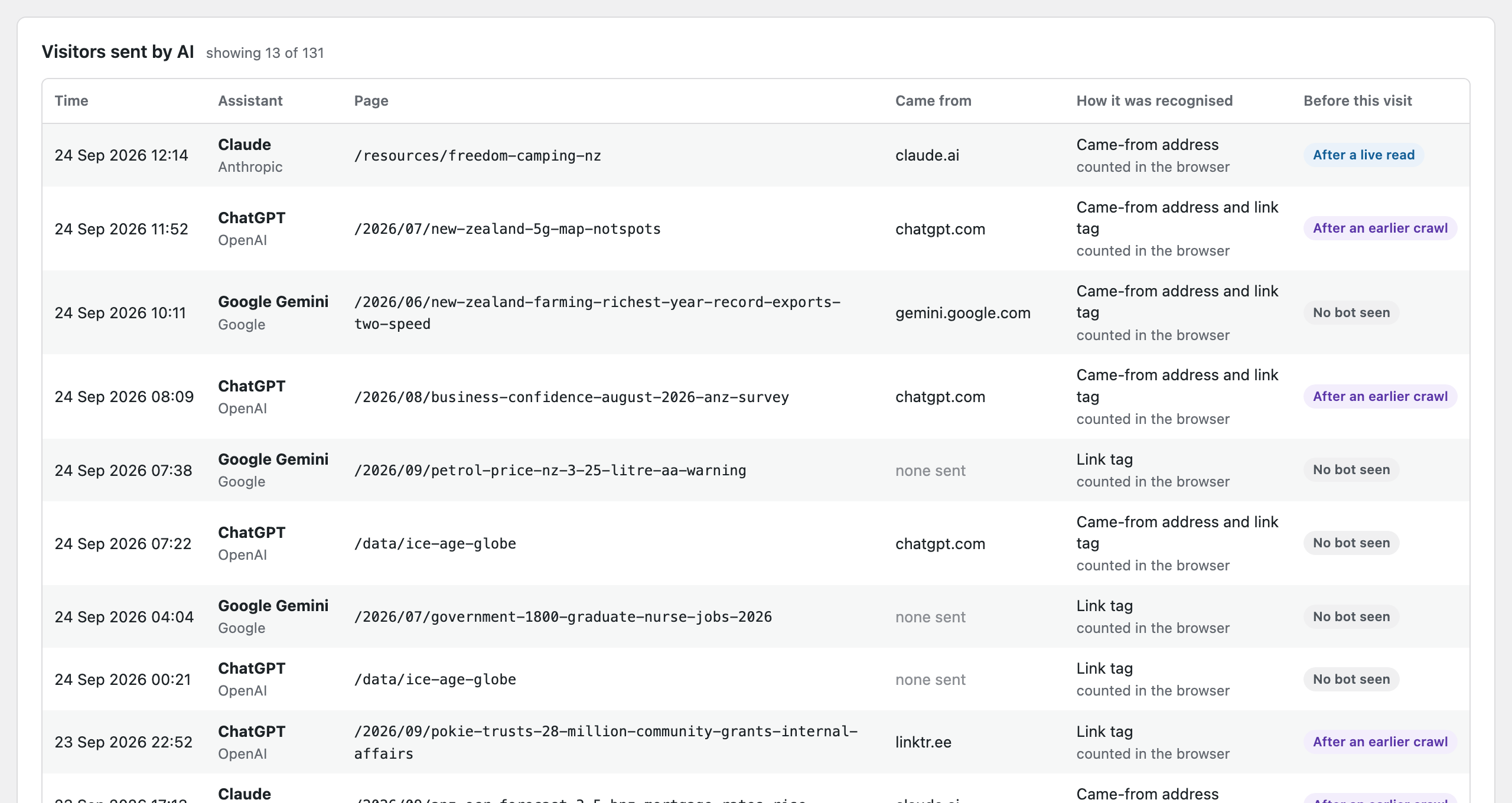
The share varies a lot by assistant. ChatGPT sent 27 of its 62 visits with no referrer, 44 percent. Copilot sent 4 of 6 that way, and the other two came from m365.cloud.microsoft rather than the copilot address most guides list. Gemini sent 8 of 45 with no referrer, 18 percent. Perplexity sent 1 of 12, and Claude none of 5. Claude adds no tag, and Perplexity and Meta AI tag some clicks and not others, so a no-referrer click from them can be invisible to everyone, including us.
Where would Google Analytics have filed these 131? Working from Google’s published rules, and treating this as reasoning rather than something we observed in GA4, it looks like this.
| Group | Where GA4 files it | Visits |
|---|---|---|
| Referrer only | AI Assistant, if Google recognises the host | 43 |
| Any click carrying a tag | Unassigned as source chatgpt.com with medium (not set), unless Google’s new rule picks the tag up | 88 |
| Neither referrer nor tag | Direct, and invisible to us too | Unknown |
The second row is the honest uncertainty, and it is two thirds of the visits. A tag outranks the referrer in Google Analytics, so a tagged click that kept its referrer and one that lost it look the same, source chatgpt.com with no medium. Before May 2026 that meant Unassigned. Google has not said whether the AI Assistant rule now picks those up, and SearchPilot’s sheet lists ChatGPT web clicks under both Referral and Unassigned. So check both rows in your own account.
Even the first row is not a sure thing. Of the 43 referrer-only visits, 11 came from Perplexity and 3 from Microsoft 365 and Meta addresses that Google may not recognise.
Both counts are floors. A visit with no referrer and no tag cannot be seen by Google Analytics or by our plugin. The bot counts are a floor too, because this site serves pages from a cache and a bot visit answered by the cache never reaches WordPress. Our caching guide explains why caches hide bot visits and how to get them back.
A second site tells you not to generalise. A travel site we run recorded 10 AI visits in the 30 days to 24 September, and 8 of them arrived with no referrer, recognised by the tag alone. Different audience, different phones, different share.
The bot side of the same nine days
This is the part no analytics report can show you. In the same nine days, AI bots made 8,887 requests to the news site, of which 4,092 were live reads, meaning a person asked an assistant something and the assistant fetched the page to answer.
Set against the 131 visitors, that is 3.2 visitors per 100 live reads. For 33 of the 131 visitors, the same company’s bot had crawled the page earlier. For 3 it had read the page shortly before. For 95 no bot visit was on record, which on a cached site mostly means the cache answered the bot.
Put the two halves together and the picture changes. Google Analytics, at best, shows you 131 people and probably fewer. Your pages were read by assistants more than 4,000 times to answer questions in the same window. Which of those numbers describes your site’s role in AI answers depends on the question you are asking.
Counting on your own site instead
A count made by your own site sees a different set of things. For bots, it records the request itself when it reaches WordPress, so no script is needed and nothing is filtered out. For visitors, it reads the referrer and the tag off the arriving request. On cached sites, where WordPress does not run for every page view, a small first-party script reports those two things back to your own site and nobody else.
Either way it recognises a visit from whichever signal is present, so the tag-only visits that Google Analytics files under Unassigned are counted as what they are.
That is what the Pro version of Forge AI Bot Log does, and it pairs each visitor with what that company’s bots did on the page beforehand, which is where the table above came from. Its limits are the same ones this article has been honest about, plus a few of its own.
- A visit with no referrer and no tag is invisible to it, exactly as it is to Google Analytics.
- On a cached site the visitor count relies on that small script, so a visitor who blocks scripts is missed there too, unless the server log is imported.
- Bot visits answered by a cache are missed unless the server log is imported.
- Visits from anyone logged in to the site are left out by default, so your own testing does not pollute the numbers.
- A visit that comes from an AI company’s own published addresses is dropped, so an assistant fetching a tagged link itself is not counted as a person.
- It counts one landing per visitor per page within half an hour, not sessions, so its totals and Google’s will never match exactly.
Common questions
Can I attribute traffic from ChatGPT or Perplexity in Google Analytics?
Partly. ChatGPT clicks that keep their referrer show under AI Assistant or Referral, and tagged clicks that lost it show under Unassigned with chatgpt.com as the source. Perplexity is not among Google’s named examples, so put it in a custom channel group. Clicks that lost both referrer and tag cannot be attributed by any tool.
Why did my Direct traffic go up when AI started sending visitors?
Because AI apps often strip the referrer. Compare Direct visits by landing page. Deep articles that people would never type by hand are the giveaway.
Does the AI Assistant channel include Google AI Overviews?
No. Google files those under Organic Search, and there is no way to separate them.
Put the two side by side
Use Google Analytics for what it is good at, which is what people do once they are on your site. Use a count on your own site for what it cannot see, which is who read your pages to answer a question and who was sent as a result.
To track AI traffic in Google Analytics honestly, check the AI Assistant channel and add the custom group today, read Unassigned with the source column open, and treat the total as a floor. Then look at the bot side, because that is where most of what AI does with your site actually happens. Our piece on what you can and cannot know about the questions behind AI visits picks up from there.
See the half Google Analytics cannot
The free plugin records every AI bot visit on your WordPress site, labelled by job and checked against each company’s published addresses. Pro adds the visitors those assistants send, recognised from the referrer or the tag, and pairs each one with the bot read that came before it.